ROBEXA KDS

Kitchen Display System for Faster Kitchen Flow

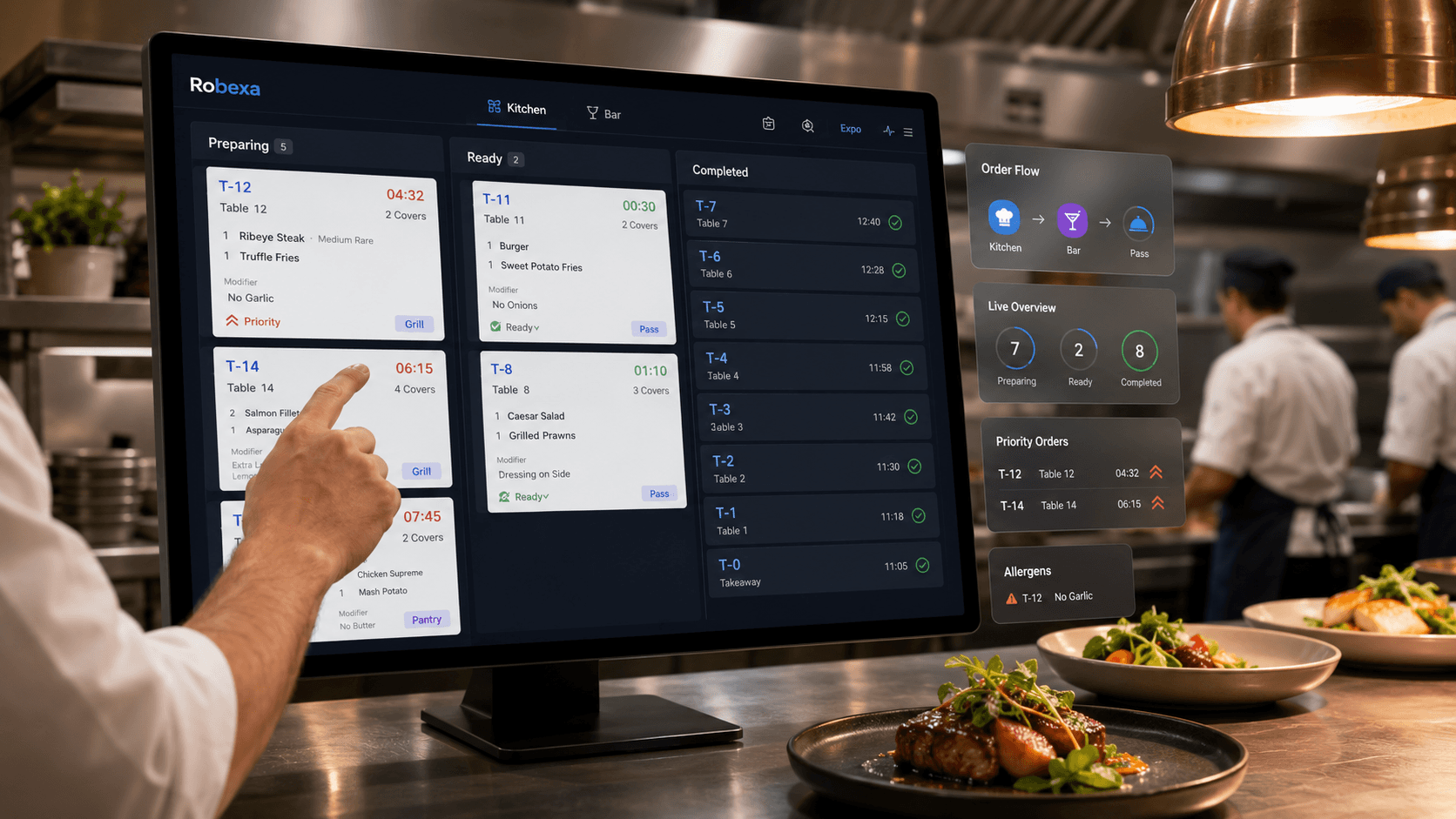
Robexa turns incoming orders into clear digital kitchen tickets, routes items to the right kitchen stations and keeps preparation, pass and pickup status visible in real time.

Built for digital tickets, station routing, prep timers, modifiers, priority handling, pass control and printer fallback.

Robexa kitchen display system for faster kitchen flow

What is a Kitchen Display System (KDS)?

A kitchen display system (KDS) shows restaurant orders digitally on kitchen screens instead of paper tickets. Robexa KDS structures tickets, stations and status for kitchen, bar and service — as back-of-house production software, not a guest-facing menu.

Why paper tickets, scattered printers and verbal handoffs break down

During rush hours, paper stacks up, multiple printers fire at once and critical notes get lost in noise. Priorities blur, modifiers get missed and gaps appear between kitchen, bar and floor — especially when QR ordering, handheld and server-fired tickets arrive together.

A digital kitchen display and kitchen ticket system does more than replace paper: it makes kitchen order management traceable, separates stations cleanly and gives the team a shared live status instead of fragmented slips and shouted updates.

What Robexa delivers as kitchen display software

Robexa KDS is more than a kitchen order screen. As restaurant kitchen display software it connects digital tickets, station routing, separate bar views, modifiers, multilingual text and operational visibility in one kitchen workflow.

Digital tickets. Clear stations. Calmer pass communication.

Digital tickets instead of paper slips

Orders appear structured on the kitchen display — no lost, smudged or duplicated paper tickets.

Station-based routing

Food, drinks and sides route to the right production station — hot line, cold prep, dessert or pass.

Separate kitchen and bar views

Dedicated kitchen and bar screens reduce overload and clarify restaurant ticket routing.

Modifiers & comments

Extras, cooking levels, allergen notes and guest requests stay visible on the ticket — not buried in a scribble.

Multilingual ticket text

Ideal for international kitchen teams: ticket content can display in multiple languages.

Live order status

Status updates on the KDS give service and management a current view — fewer trips to the pass.

Kitchen ↔ service communication

Clarifications flow more cleanly than shouting across a busy line.

Printer fallback

Print workflows can stay connected where needed — paperless kitchen without hard dependency on one device.

Pass & expeditor visibility

The kitchen pass screen consolidates ready and in-progress items for better firing and pickup timing.

Rush-hour prioritisation

Tickets can sort by urgency, table or course instead of treating everything equally.

Prep timers on tickets

Preparation timers help teams track firing, hold times and course pacing directly on the ticket.

Handheld & service intake

Orders from handheld, floor service or online ordering land in the same kitchen ticket system — QR menu as one channel, not the product focus.

Manager visibility

Restaurant operations software with better sightlines into flow, bottlenecks and team coordination.

How Robexa KDS workflow works

  1. Order arrives

    From handheld, floor service, online ordering or QR menu — centrally in your system, not as an isolated channel.

  2. Robexa structures the order

    Items, modifiers, notes, timing and table context become digital kitchen tickets.

  3. Route to stations

    Lines go to kitchen, bar, dessert or other production areas — based on your setup.

  4. Update status on the KDS

    The kitchen team marks progress on the production screen — live order status for everyone involved.

  5. Service reacts faster

    Floor staff see progress and can inform guests proactively — fewer walks to the kitchen.

  6. Pass & completion

    Finished items appear at the pass, get picked up or move to served / ready-for-pickup status.

Kitchen station routing built for real layouts

Every kitchen runs differently. Robexa KDS supports multiple production stations and views — from the hot line to the bar station and expeditor screen.

Hot kitchen

Hot food, mains and time-critical production.

Cold kitchen / starters

Salads, cold starters and lighter courses kept separate.

Bar & beverages

Bar and kitchen order routing — cocktails, soft drinks and coffee at the right station.

Dessert

Later courses without colliding with main production.

Pass / expeditor

Kitchen pass screen for pickup timing and service coordination.

Print fallback

Optional print zones for stations without a display.

Paper tickets, basic KDS or Robexa?

Many venues start with printers or a standalone kitchen display. Robexa connects the KDS system with restaurant operations.

Paper & printer-only

  • Slips get lost or become unreadable
  • No live status for service
  • Hard to manage modifiers and priorities
  • Disconnected from QR, handheld and web channels

Generic KDS

  • Shows tickets but often in isolation
  • Limited connection to ordering channels
  • Little context on table, course or channel
  • Service stays outside the loop

Robexa KDS

  • Digital kitchen ticket system inside the stack
  • QR, handheld, service and online as intake
  • Stations, bar, pass and status connected
  • Kitchen display software with operational context

KDS inside the Robexa platform

A POS kitchen display system delivers most value when orders, service and reporting stay connected. Robexa KDS is part of restaurant operations software — not an isolated kitchen screen.

  • Digital menu & QR menu as an order source
  • Handheld ordering with table context
  • Online ordering and pickup
  • Service workflows with live status
  • Printer fallback and production zones
  • Visibility for kitchen leadership and management

See kitchen ticket routing in a live demo

Robexa KDS connects digital tickets, station views, bar routing and live status in one kitchen workflow — back-of-house production alongside your guest-facing menu.

Benefits for kitchen, bar, service and guests

Head chef

Better overview of stations, priorities and bottlenecks during service.

Line cook

Clear tickets with modifiers — fewer clarifications and rework.

Bar team

Drinks and bar food separated from the main line without losing context.

Service staff

Live kitchen status instead of constant trips — faster guest communication.

Restaurant manager

More operational transparency and consistent flows across channels.

Guests

Fewer missed items, clearer timing expectations and calmer service.

Who is a kitchen display system useful for?

From café bars to multi-station restaurant kitchens — a digital kitchen display scales with your concept.

Full-service restaurants

Multi-course production, pass and floor coordinated.

Quick-service restaurants

High throughput with clear ticket routing and prioritisation.

Cafés & bistros

Kitchen and counter in parallel — without paper chaos.

Bars with food

Drinks and food separated, still synchronised.

Hotels & multi-area venues

Multiple production zones and international teams.

Multi-station kitchens

Hot, cold, dessert and pass in one control layer.

High-volume restaurants

Peak load with priorities instead of paper stacks.

Moving off paper

Paperless kitchen gradually, with printer fallback if needed.

Operational benefits — qualitative, not inflated

  • Fewer missed or double-fired items
  • Clearer priorities during rush
  • Calmer communication between kitchen and service
  • Better visibility into progress and bottlenecks
  • Less dependence on paper and verbal updates
  • Easier onboarding for new kitchen staff
  • More consistent output across ordering channels
  • Stronger foundation for guest-facing service quality

FAQ: Kitchen Display System

What is a Kitchen Display System?

A kitchen display system (KDS) shows restaurant orders digitally on kitchen screens instead of paper tickets. Robexa KDS structures tickets, stations and status for kitchen, bar and service.

Is KDS better than paper tickets?

For most venues, yes: digital tickets are clearer, status-aware and better connected to QR ordering, handheld and service — especially during peak hours.

Does Robexa KDS work with QR ordering?

Yes. QR menu orders arrive as structured tickets on the kitchen display — including modifiers and table context.

Can kitchen and bar be separated?

Yes. Separate kitchen and bar views are supported so each station sees only relevant tickets.

Are modifiers and comments displayed?

Yes. Extras, cooking levels, allergen notes and guest comments can appear on the ticket.

Is multilingual display supported?

Yes. Ticket text can be shown in multiple languages for international kitchen teams.

Do we need special hardware?

Displays and mounts are planned for your venue during implementation.

Does KDS replace printers entirely?

Not necessarily. Many venues run paperless on screen and keep printers as an optional fallback.

Can printers still be used?

Yes. Print zones can remain connected alongside the KDS where that fits your workflow.

Can service see kitchen status?

Yes. Live status on the KDS helps the floor team — fewer trips and clearer guest updates.

Is KDS suitable for small restaurants?

Yes. Even compact kitchens benefit from clear tickets and less paper — scalable to your needs.

Is KDS suitable for multi-station kitchens?

Yes. Hot kitchen, cold prep, bar, dessert and pass can all be represented.

How does onboarding work?

Robexa supports setup, station configuration and training for kitchen and service as part of rollout.

Does it work with handheld ordering?

Yes. Handheld orders flow into the same kitchen ticket system as QR and floor-fired tickets.

Ready to see the kitchen workflow live?

Experience how Robexa KDS connects tickets, stations, bar routing and service status in one kitchen display system.